Document information
Tags/Project: Equipment-wiki
| Metadata Field | Document Information |
|---|---|
| Status | Draft |
| Created | 2026-09-24 |
| Last Updated | 2026-09-29 |
| Author | Davide Cuneo |
| Rev. # | 0.4 |
| Reviewers | TBD |
Source documents. This note combines the notes taken at SM18 (CERN) with the CERN document.
Introduction and Context
The Safety Matrix is the heart of the magnet protection system of the test bench. It collects the trigger signals generated by the quench detection systems (PotAim cards, uQDS) and, based on a configurable logic, distributes them to the equipment that must react to protect the magnet: power converters, energy extraction, quench heaters, CLIQ. It also triggers the DAQ, so that the signals around the event are recorded.
The Safety Matrix is housed in a crate containing three kinds of daughter cards: InterADA, InterOUT and InterMem. In daily operation, the only cards we act on directly are the InterOUT cards: each of them decides which input triggers are monitored for a given piece of equipment and with which delay the equipment is triggered. The other cards are configured once and are normally not touched.
This note describes the Safety Matrix as a whole: its general working principle, the connectors of the crate, the flow of the signals inside it and the function of each card.
General Description
The Safety Matrix takes up to 16 input trigger signals and, through its daughter cards, can trigger up to 10 actuators used for magnet protection.
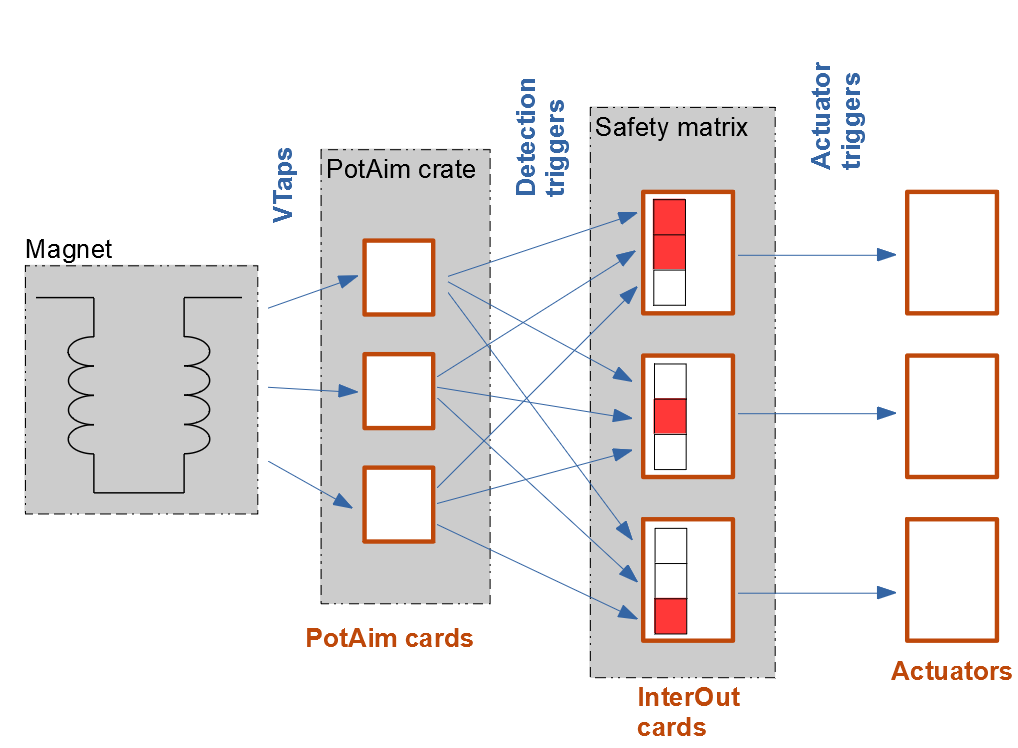
The input trigger signals usually come from the PotAim cards, which check whether certain voltage signals of the magnet stay above a threshold for a certain amount of time (the validation time). If this happens, the PotAim generates a trigger, which enters the Safety Matrix and is distributed to the actuators with user-defined delays. Other detection systems, such as the uQDS, can be connected to the inputs in the same way.
Examples of common actuators are:
- Power converters, which receive a Fast or Slow Power Abort (FPA/SPA);
- the Energy Extraction (EE) system;
- the Quench Heaters (QH);
- the CLIQ (Coupling-Loss Induced Quench) system.
The Safety Matrix is also used to trigger the DAQ system.
From the quench to the actuators
The time sequence of the events, from the start of a quench to the triggering of the actuators, is shown in Figure 2.
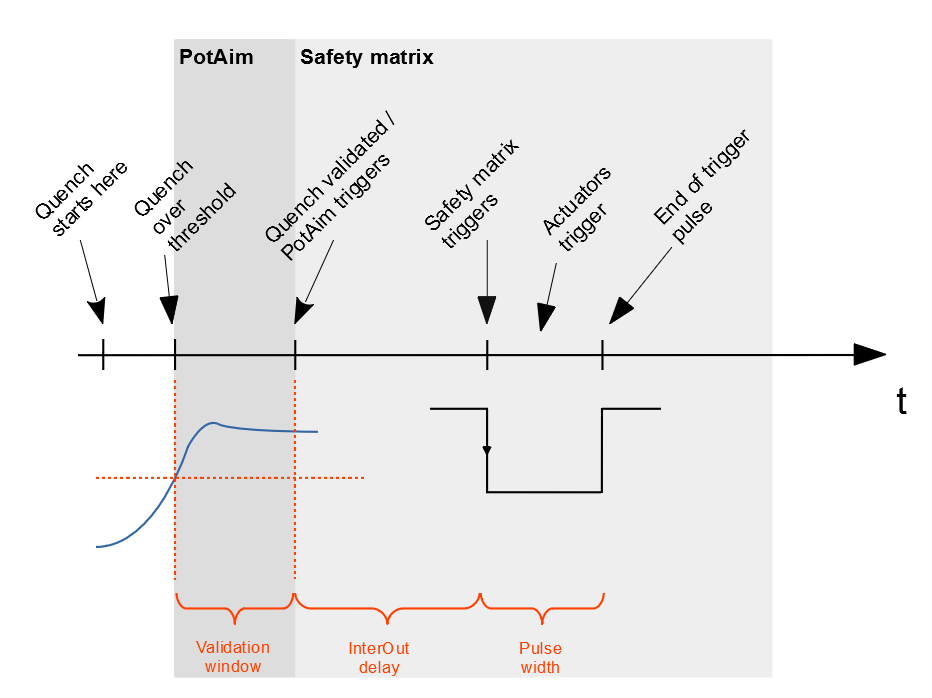
- The quench starts and the resistive voltage of the coil begins to grow.
- The voltage crosses the threshold set on the PotAim card.
- Validation window (PotAim). The voltage must stay above the threshold for the whole validation time. This avoids triggering on short spikes or noise.
- The quench is validated and the PotAim sends its trigger to the Safety Matrix.
- InterOUT delay (Safety Matrix). Each InterOUT card waits for its own configured delay. Different actuators can therefore be fired in a precise order.
- The actuators are triggered. The trigger is a pulse of fixed width (500 ms on the new InterOUT cards), after which the output returns to its idle state.
Example: configuration of a test station at SM18
To give an idea of the equipment that can be protected by the Safety Matrix in an environment similar to FREIA, the assignment of the ten InterOUT cards in the SM18 station observed during the MCBRD tests is reported below. The magnet had two apertures, each with its own power converter and energy extraction.
Table 1: Assignment of the InterOUT cards in the SM18 station.
| InterOUT card | Actuator |
|---|---|
| 1 | High-frequency DAQ |
| 2 | Low-frequency DAQ (normally not used) |
| 3 | Power converter 1 |
| 4 | Energy extraction of power converter 1 |
| 5 | Power converter 2 |
| 6 | Energy extraction of power converter 2 |
| 7 | Quench heater 1 |
| 8 | Quench heater 2 |
Crate Connectors
All the connections of the Safety Matrix are made at the back of the crate (Figure 3):
- the input terminal block, where the incoming trigger signals (inputs 1–16) are screwed in;
- the ten Burndy 4 output connectors (outputs 1–10), one per InterOUT card, which carry the triggers to the actuators;
- the Burndy 28 output trigger connector, which collects all the outgoing trigger signals to be recorded by the DAQ;
- the power connector (220 V) of the chassis.

Input terminal block
The incoming trigger signal cables are screwed into the bottom part of the terminal block (Figure 4). The terminals have two colours:
- Blue terminals: positive side of the input signals, one per input (1 to 16). The exception is the last blue terminal, marked 17, which is connected to the system GND (negative power rail of the crate).
- Grey terminals: negative side of the input signals. They are all connected together by a metal bar on the terminal block. The exception is the grey terminal before the first blue one, which is connected to the positive power rail of the crate, +15 V (on some crate variants it is +12 V).
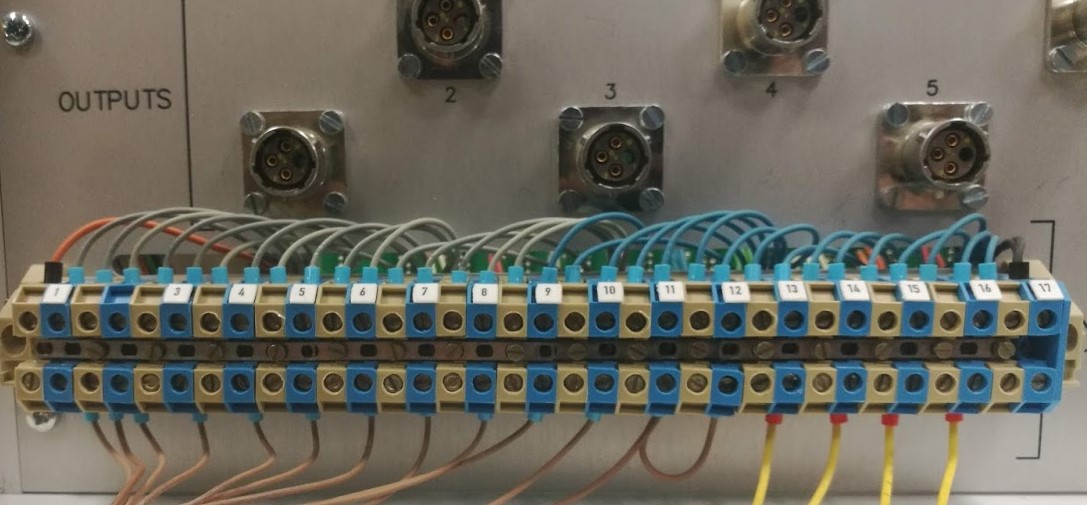
The polarity of each input (active low or active high) can be configured on the InterADA cards (see Magnet Test Facility - Equipment/Safety Matrix > InterADA).
Output trigger connector (Burndy 28 female)
This connector carries the logic outputs of the ten InterOUT cards, i.e. the same triggers sent to the actuators. These are raw signals, without relay or optocoupler, so they must not be used to drive other devices: they are only meant to be recorded by the DAQ system, so that the post-mortem analysis can show when each InterOUT card fired.
Table 2: Pinout of the Burndy 28 output trigger connector.
| Pin | Signal | Pin | Signal |
|---|---|---|---|
| 1 | Trigger OUT 1 | 2 | GND |
| 3 | Trigger OUT 2 | 4 | GND |
| 5 | Trigger OUT 3 | 6 | GND |
| 7 | Trigger OUT 4 | 8 | GND |
| 9 | Trigger OUT 5 | 10 | GND |
| 11 | Trigger OUT 6 | 12 | GND |
| 13 | Trigger OUT 7 | 14 | GND |
| 15 | Trigger OUT 8 | 16 | GND |
| 17 | Trigger OUT 9 | 18 | GND |
| 19 | Trigger OUT 10 | 20–28 | GND |
The polarity of these signals is set by the Up/Down polarity jumper of each new InterOUT card: Down gives a falling edge, Up gives a rising edge (on the old InterOUT cards they were always active low).
Output connectors (Burndy 4 female)
Each of the ten Burndy 4 connectors corresponds to one InterOUT card and carries the output trigger that controls its actuator.
Table 3: Pinout of the Burndy 4 output connectors.
| Pin | Signal |
|---|---|
| 1 | InterOUT x, back-plane pin A/B 20 |
| 2 | InterOUT x, back-plane pin A/B 22 |
| 3 | InterOUT x, back-plane pin A/B 24 |
| 4 | Not connected |
Depending on the configuration of the card, the output can be a dry contact (relay or opto), a pull-up voltage signal (relay or opto) or a current loop (opto). Which pins are used depends on the configuration(see 1. Safety Matrix - InterOUT output configurations explained).
Signal Flow of the Safety Matrix
The path of the signals inside the crate is shown in Figure 5.
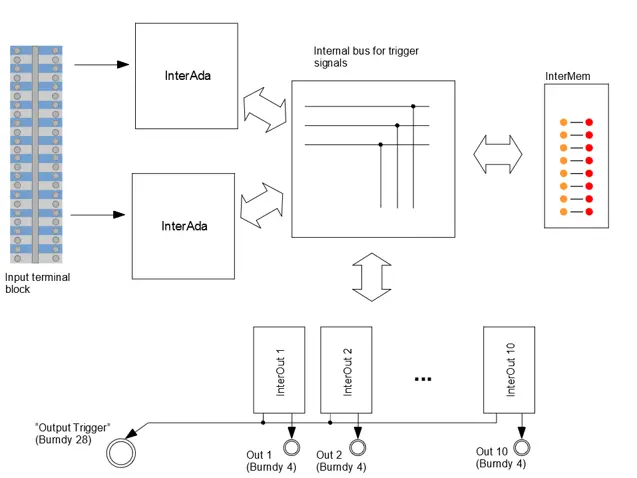
- The input trigger signals arrive at the terminal block.
- They are conditioned by the two InterADA cards and placed on the lower or upper 8 lines of the internal bus (16 lines in total).
- The InterMem module monitors the bus and shows which inputs became active and which one was the first.
- The ten InterOUT cards are connected to the same bus. Each of them generates an output trigger for its actuator based on the combination of input triggers enabled on it.
- The output of each InterOUT goes to its Burndy 4 connector (actuator) and to the Burndy 28 connector (DAQ recording).
Daughter Cards
The Safety Matrix contains three kinds of cards:
| Card | Quantity | Function |
|---|---|---|
| InterADA | 2 | Conditioning of the input signals: optical isolation and optional inversion. Each card handles 8 inputs and maps them to the lower or upper half of the 16-line internal bus. |
| InterOUT | up to 10 | Generates the trigger for one actuator from a logical OR of the enabled input lines, with configurable delay and output type (relay/opto, polarity, supply). |
| InterMem | 1 | Indicates the currently active triggers and the one that triggered first. |
Old and new versions exist for these cards; for the InterOUT, only the new version is in use.
InterADA
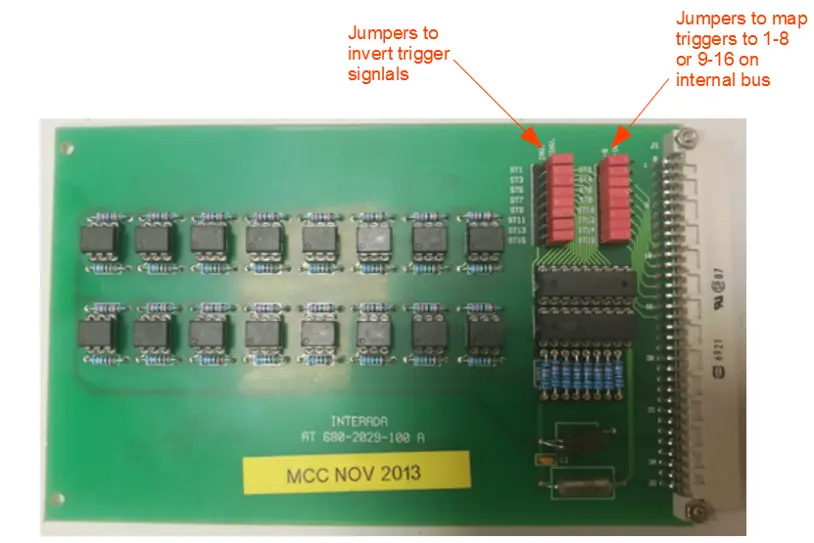
The InterADA card conditions the input signals coming from the terminal block at the back of the chassis. It isolates them optically and can invert them, by setting the jumpers to INV (inverted) or NINV (not inverted).
Polarity of the inputs
The signals must be configured so that they are active low at the input of the InterOUT cards. The output of a PotAim card is already active low, so a PotAim input must not be inverted by the InterADA.
A second set of jumpers maps the 8 inputs of the card to the internal bus: one InterADA must be configured on the lower 8 lines (inputs 1–8), the other on the upper 8 lines (inputs 9–16).
InterOUT
The InterOUT is the card that makes the Safety Matrix a “matrix”: it links a set of inputs to one actuator. Each card monitors the 16 input lines of the internal bus, each of which can be enabled or disabled independently. As soon as any enabled line triggers (logical OR), the card generates an output trigger with the polarity and type configured on it, after a configurable delay.
In practice, each InterOUT is associated with one actuator and with a combination of input triggers: by choosing which inputs are enabled on each card, one decides which detection signals fire which equipment.
Enabling the input channels
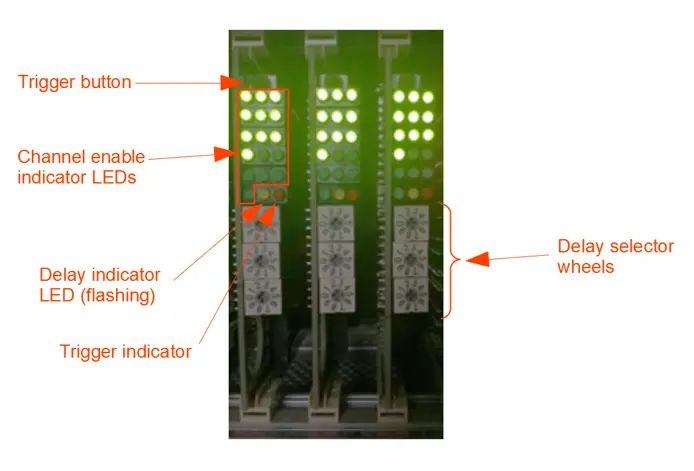
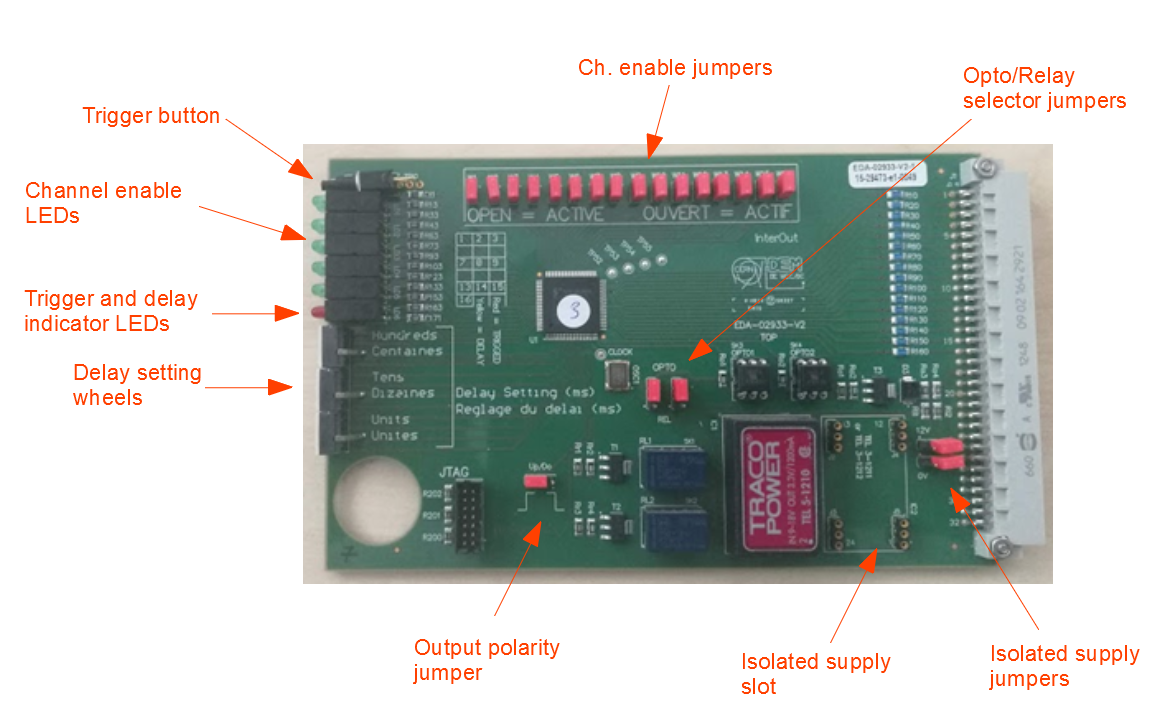
On the new card the 16 input channels are enabled or disabled with the jumpers at the top of the card. A channel is enabled when its jumper is removed. The LED block on the front panel shows the enabled channels (lit green).
Note
On the old InterOUT card the channels were enabled with toggle switches (switch up = enabled). Since only the new card is in use, the jumpers are the reference.
Setting the delay
The delay is set with three wheel switches on the front of the card:
| Wheel | Range | Step |
|---|---|---|
| Units | 0–9 ms | 1 ms |
| Tens | 0–90 ms | 10 ms |
| Hundreds | 0–900 ms | 100 ms |
The delay of the card is the sum of the three wheels, from 0 to 999 ms. The time step of each wheel is printed on the PCB. For example, wheels set to 2 (hundreds), 5 (tens) and 0 (units) give a delay of 200 + 50 + 0 = 250 ms.
Front panel indications and controls
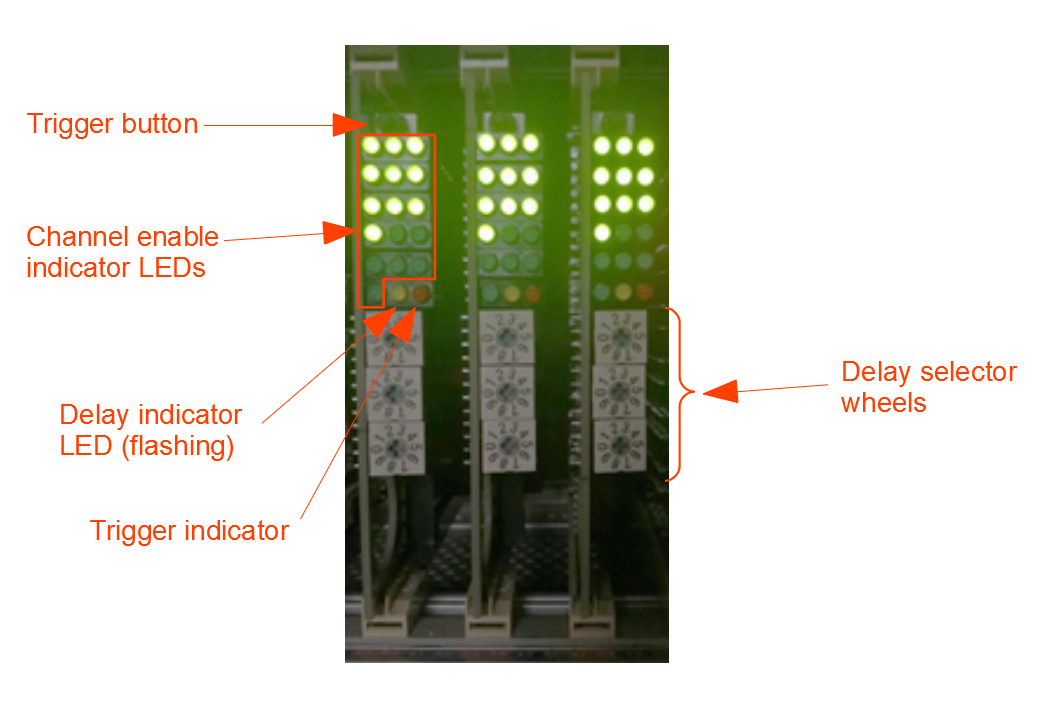
- Green LEDs: enabled input channels.
- Yellow LED (delay indicator): flashes if a delay different from 0 is selected on any of the wheels.
- Red LED (trigger indicator): lights up during triggering.
- Push button: triggers the card manually. It is useful to test the connection to the actuator.
Output trigger
- The output trigger is a pulse of 500 ms.
- If a trigger on an enabled input stays present for longer than 8 s, the output starts to trigger continuously as well, until the input trigger disappears.
Output configuration
Each card can be configured for the actuator it drives:
- relay or opto output, with the opto/relay selector jumpers;
- output polarity (Up/Down), with the polarity jumper;
- auxiliary isolated supply (empty, voltage source or current source) in the isolated supply slot, connected with the 12V iso and 0V iso jumpers.
The typical settings are summarised below. The meaning of each setting, the circuit behind the Burndy 4 connector and the reasons for each choice are explained in Safety Matrix - InterOUT output configurations explained.
Table 4: Common output configurations (from the CERN document).
| Actuator | Signal type | Pins | Up/Down | Relay/Opto | Aux. supply | 0V iso | 12V iso |
|---|---|---|---|---|---|---|---|
| DAQ trigger | Pull-up | 1-2 | Down | Opto | 5 V voltage source | Connected | Connected |
| PC FPA/SPA | Dry contact | 1-2 | Down | Relay | Empty | Disconnected | Disconnected |
| EE (30 kA) | Current loop | 3-1 | Up | Opto | 40 mA current source | Connected | Disconnected |
| QH | Dry contact | 1-2 | Down | Relay | Empty | Disconnected | Disconnected |
| CLIQ | Pull-up | 3-1 | Up | Opto | 12 V voltage source | Connected | Disconnected |
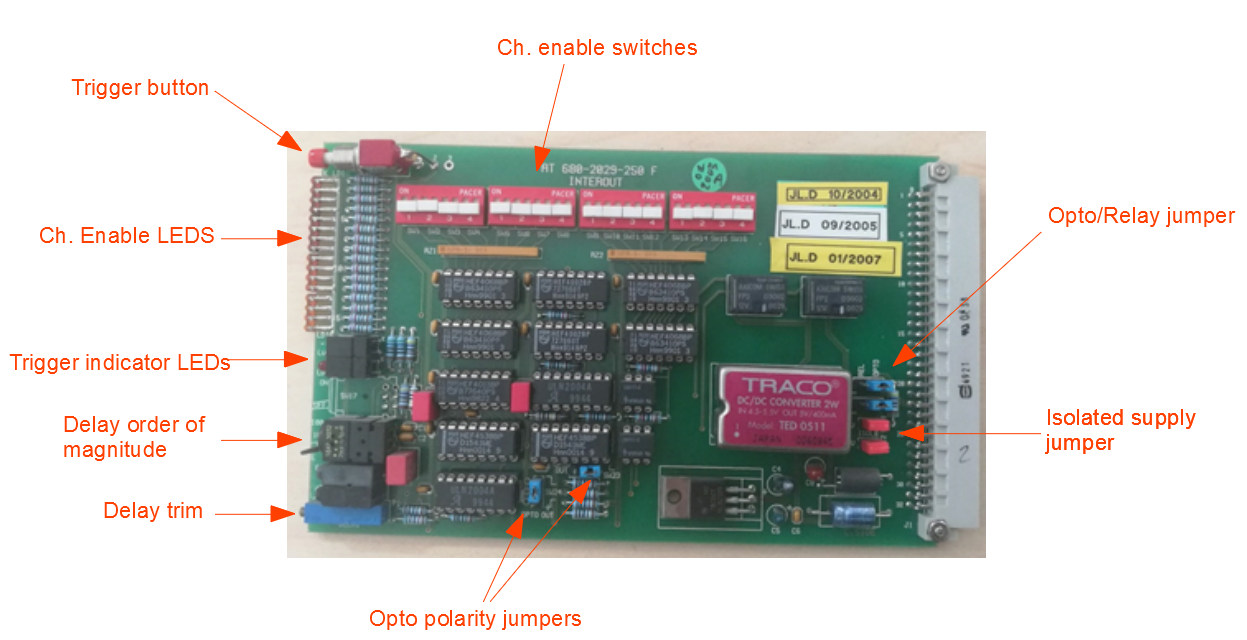
Old InterOUT card
For reference, the old version of the card (Figure 10) had the same function, with the following differences:
- the input channels were enabled with toggle switches (up = enabled);
- the delay was set with a trimmer potentiometer on the front, with a flip switch above it to select the order of magnitude;
- the output pulse lasted 330 ms;
- a green LED was lit when there was no trigger, and the red LED during a trigger;
- the delay started at the falling edge of the input trigger;
- only the polarity of the opto could be changed; the relays always closed on trigger;
- the pull-up resistor was 4.7K instead of 5K.
InterMem
The InterMem unit gives a simple indication of which input lines triggered (the 16 inputs from the terminal block) and which one triggered first.
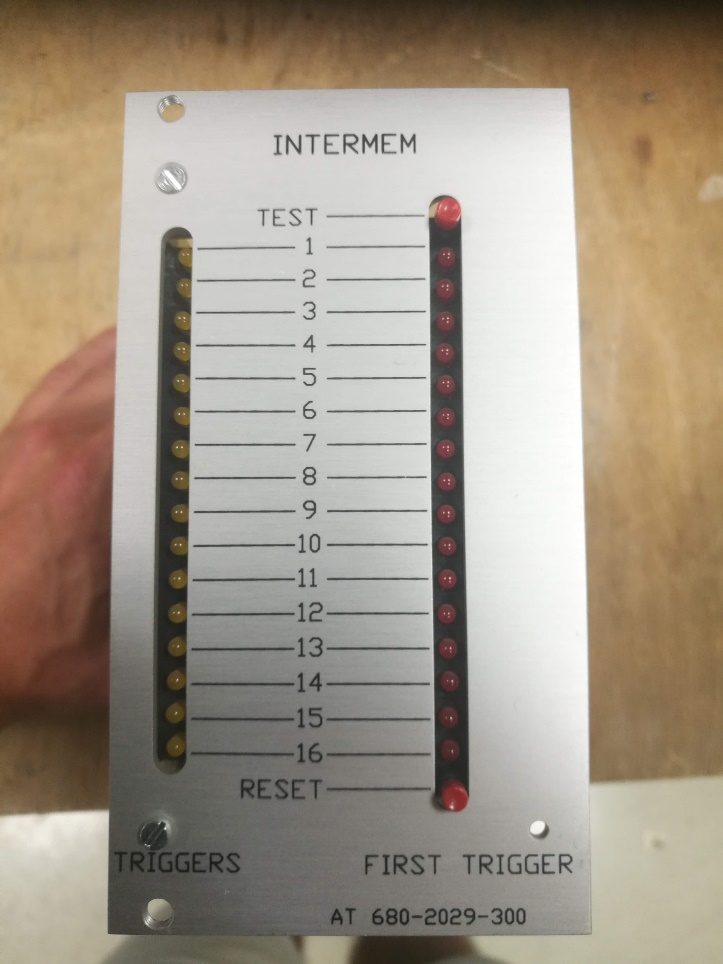
- The left column of LEDs (yellow, TRIGGERS) shows the inputs that have triggered.
- The right column of LEDs (red, FIRST TRIGGER) shows the single input that triggered first.
- The TEST button lights up all the LEDs, to check that they work.
- The RESET button clears all the indications and resets the first-trigger latch.
Important
The InterMem shows the inputs that triggered, not the InterOUT cards that fired: which outputs reacted depends on the configuration of each InterOUT. After a quench, the InterMem is the first place to look to find out which detection system fired first, and its RESET button must be pressed before the bench can be powered again (see 2. Post-quench recovery of the test bench).
Back-Plane Connector Layouts
For troubleshooting, the layouts of the back-plane connectors of the InterADA and InterOUT cards are reported below.
Table 5: InterADA back-plane connector.
| Pins | Signal |
|---|---|
| A1/B1 … A16/B16 | Trigger IN 1 … 16 (to InterOUT) |
| A17/B17 | Not connected |
| A18 / B18 | Trigger IN positive / negative 1/9 (from terminal block) |
| A19 / B19 | Trigger IN positive / negative 2/10 |
| A20 / B20 | Trigger IN positive / negative 3/11 |
| A21 / B21 | Trigger IN positive / negative 4/12 |
| A22 / B22 | Trigger IN positive / negative 5/13 |
| A23 / B23 | Trigger IN positive / negative 6/14 |
| A24 / B24 | Trigger IN positive / negative 7/15 |
| A25 / B25 | Trigger IN positive / negative 8/16 |
| A26–A27 / B26–B27 | Not connected |
| A28/B28 | Power supply positive |
| A29–A31 / B29–B31 | Not connected |
| A32/B32 | Power supply negative (system GND) |
The notation “1/9” means input 1 for the InterADA mapped on the lower lines and input 9 for the one mapped on the upper lines.
Table 6: InterOUT (new version) back-plane connector.
| Pins | Signal |
|---|---|
| A/B 1 … A/B 16 | Trigger signal 1 … 16 from InterADA |
| A/B 17 | Not connected |
| A/B 18 | Output to Burndy 28 (DAQ recording) |
| A/B 19 | Not connected |
| A/B 20 | Pin 1 of the corresponding Burndy 4 |
| A/B 21 | Not connected |
| A/B 22 | Pin 2 of the corresponding Burndy 4 |
| A/B 23 | Not connected |
| A/B 24 | Pin 3 of the corresponding Burndy 4 |
| A/B 25–27 | Not connected |
| A/B 28 | +12 V supply |
| A/B 29–31 | Not connected |
| A/B 32 | System GND |
Open Points
- Assignment of the InterOUT cards at FREIA. A table like Table 1 should be added for the FREIA test bench, with the actuator, the enabled input channels and the delay of each card.
- Assignment of the inputs at FREIA. The correspondence between the 16 inputs of the terminal block and the detection systems (PotAim channels, uQDS) should be documented. In the SM18 case observed, the uQDS was wired to “slots 15 and 16” of the Safety Matrix, presumably inputs 15 and 16.
- Power rail of the terminal block. To be checked whether the crate at FREIA uses +15 V or +12 V.
- Figure captions. The captions of Figures 3, 5, 6 and 7 (images from the author’s notes) should be checked against the images.
Feedback
Found an error or something outdated in this note? Please contact Davide Cuneo (davide.cuneo@physics.uu.se).