Document information
Tags/Project: Operational-Notes-wiki
| Metadata Field | Document Information |
|---|---|
| Status | Draft |
| Created | 2026-09-24 |
| Last Updated | 2026-10-05 |
| Author | Davide Cuneo |
| Rev. # | 0.5 |
| Reviewers | TBD |
Introduction and Context
Looking at the Safety Matrix crate in FREIA, the InterOUT cards that send the trigger to the Energy Extraction (EE) are clearly different from the ones going to the Power Converters (PCs) and to the Data Acquisition (DAQ). On the EE cards a small module is plugged into the slot labelled isolated supply slot: it is a current source. On the other cards the slot holds a voltage source.
The CERN documentation explains this in the section Output configurations, but it is written for people used to electronics and it is hard to follow. This note explains the same content step by step, starting from the basic concepts, so that anyone working on the test bench can understand:
- what the output stage of an InterOUT card is made of;
- why each destination (DAQ, PC, EE) needs a different configuration;
- what happens, physically, in normal operation and when the Safety Matrix triggers;
- what must be checked when a card is installed or replaced.
Only the new version of the InterOUT card is described, since it is the one in use.
The Safety Matrix in a Nutshell
The Safety Matrix is the “switchboard” of the magnet protection. It receives up to 16 input triggers, usually from the PotAim cards or from the uQDS, and uses them to trigger up to 10 actuators: power converters (fast or slow power abort), energy extraction, quench heaters, CLIQ. It also triggers the DAQ, so that the signals around the quench are recorded.
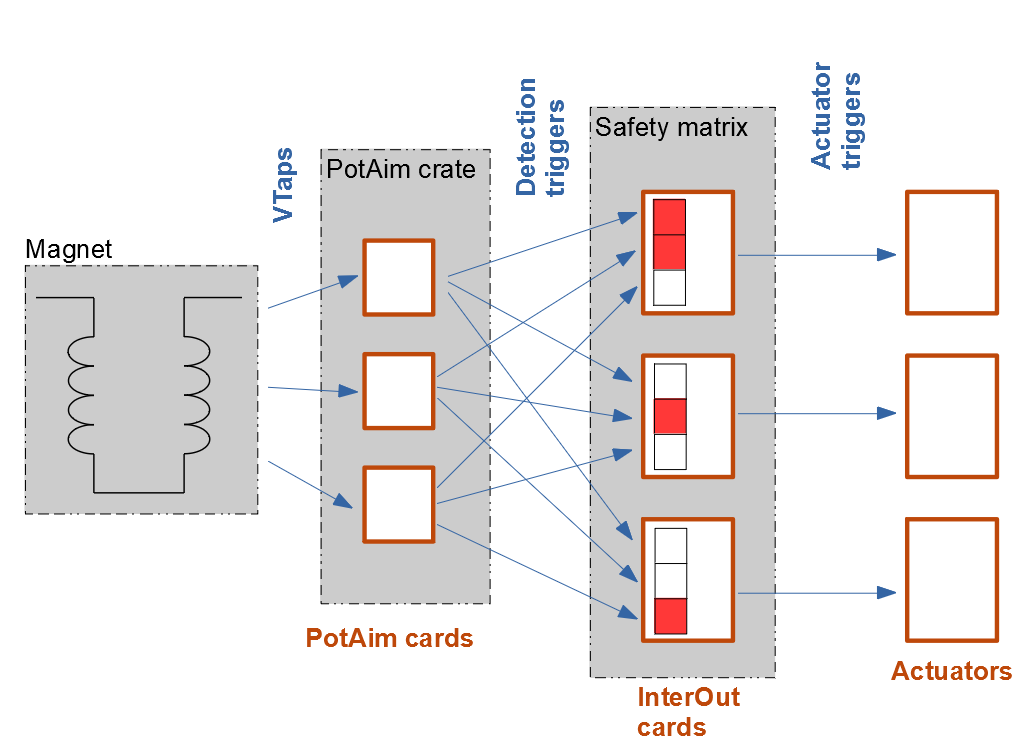
Inside the crate the signal goes through three kinds of cards (Figure 2):
- InterADA (2 cards). They receive the 16 input signals from the terminal block at the back of the crate, isolate them optically and, if needed, invert them. Each card handles 8 inputs and puts them on the lower (1–8) or upper (9–16) half of an internal bus.
- InterOUT (up to 10 cards, one per actuator). Each card watches the input lines that have been enabled on it. As soon as any one of them triggers (logical OR), the card sends a trigger to its actuator, after an adjustable delay.
- InterMem (1 unit). It shows which inputs have triggered (yellow LEDs) and which one triggered first (red LEDs). Its RESET button is the one used after a quench, see 2. Post-quench recovery of the test bench.
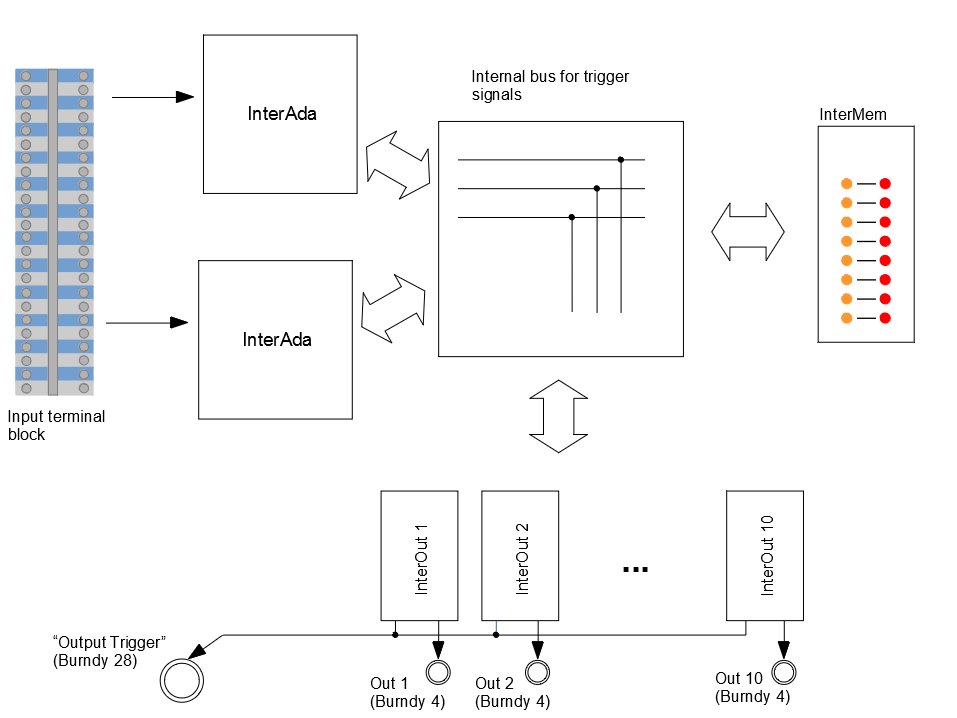
Each InterOUT card has its own Burndy 4 connector at the back of the crate (outputs 1 to 10), which goes to its actuator. This note is about what happens between the card and that connector.
A Few Electrical Basics
This section introduces the few concepts needed to understand the rest of the note. The water analogy helps: think of an electrical circuit as a closed loop of pipes in which water is pushed around by a pump.
Voltage, current and resistance
- Voltage (V, volt) is the “pressure” pushing the water. A 5 V source is a pump that keeps a pressure of 5 V between its two outlets.
- Current (I, ampere) is the “flow” of water, i.e. how much passes through the pipe per second. 40 mA means 0.04 A.
- Resistance (R, ohm) is a narrowing in the pipe, which opposes the flow. A 5K resistor is a resistance of 5000 Ω.
The three quantities are linked by Ohm’s law:
In words: to push a current I through a resistance R, you need a voltage V equal to their product. This formula is enough to understand one of the key choices of the EE configuration.
Closed circuit and switch
Current only flows if the loop is closed: from one terminal of the source, through the load, and back to the other terminal. If the loop is interrupted at any point, the flow stops everywhere.
A switch is simply a tap in the loop: closed, the current flows; open, it stops. All the outputs of the InterOUT card are, in the end, a switch opening or closing when the Safety Matrix triggers.
Two kinds of electrically controlled switches
The InterOUT card can use two kinds of switches, selected with a jumper:
- Relay. A mechanical switch moved by a small electromagnet. When the card energises the coil, a metal contact physically moves.
- Optocoupler (opto). An electronic switch operated by light. Inside there is a small LED and, facing it, a light-sensitive transistor: when the LED is on, the transistor conducts (switch closed); when it is off, it does not (switch open). Also here there is no electrical connection between the two sides, only light. It is fast and has no moving parts, but it only works in one direction and can only carry small currents.
On the new InterOUT card the switch is always doubled: two relays in series or two optos in parallel.
Isolation
“Isolated” means that the two sides of the relay or opto have no electrical connection: no common ground, no common wire. This is essential in magnet protection, because it prevents noise, ground loops or faults of an actuator from travelling back into the Safety Matrix (and vice versa). For the same reason the auxiliary supply on the card is an isolated supply, with its own ground called isolated GND (or 0V iso), separate from the ground of the crate.
Jumpers
A jumper is a tiny removable bridge that connects two pins on the board. Jumper in place = the two points are connected; jumper removed = they are separated. On the InterOUT card two jumpers decide whether the isolated supply is connected to the output stage or not.
Three ways to send a signal
With the elements above, the card can “talk” to an actuator in three ways
- Dry contact. The card only provides a switch; the actuator provides the voltage and the current. The actuator simply checks whether its own loop is open or closed. The supply slot on the card stays empty.
- Pull-up output. The card provides a voltage through a resistor (the 5 kOhm, called pull-up resistor because it “pulls” the output up to the supply voltage). When the switch is open, the output sits at the supply voltage (HIGH); when the switch closes, it connects the output to ground and the output drops to 0 V (LOW). The actuator reads a voltage level.
- Current loop. The card provides a constant current that flows through the actuator. The actuator reads whether the current is flowing or not.
Edges and “active low”
A digital signal has two levels, HIGH and LOW. The passage from HIGH to LOW is a falling edge; from LOW to HIGH a rising edge. A signal is active low when the “event” (here, the trigger) corresponds to the LOW level. The PotAim outputs and the signals inside the Safety Matrix are active low.
Fail-safe
A protection signal is fail-safe when every possible fault produces the same effect as a real trigger. For example: if a cable is cut, the actuator must not simply “stop hearing” the Safety Matrix and keep going, but it must behave as if a trigger had arrived. A loop that is normally closed, with current flowing, and that is interrupted by the trigger is fail-safe: a cut cable, a missing card or a switched-off crate also interrupt it.
The New InterOUT Card
Before looking at the output stage, it is useful to know where things are on the card (Figures 3 and 4).
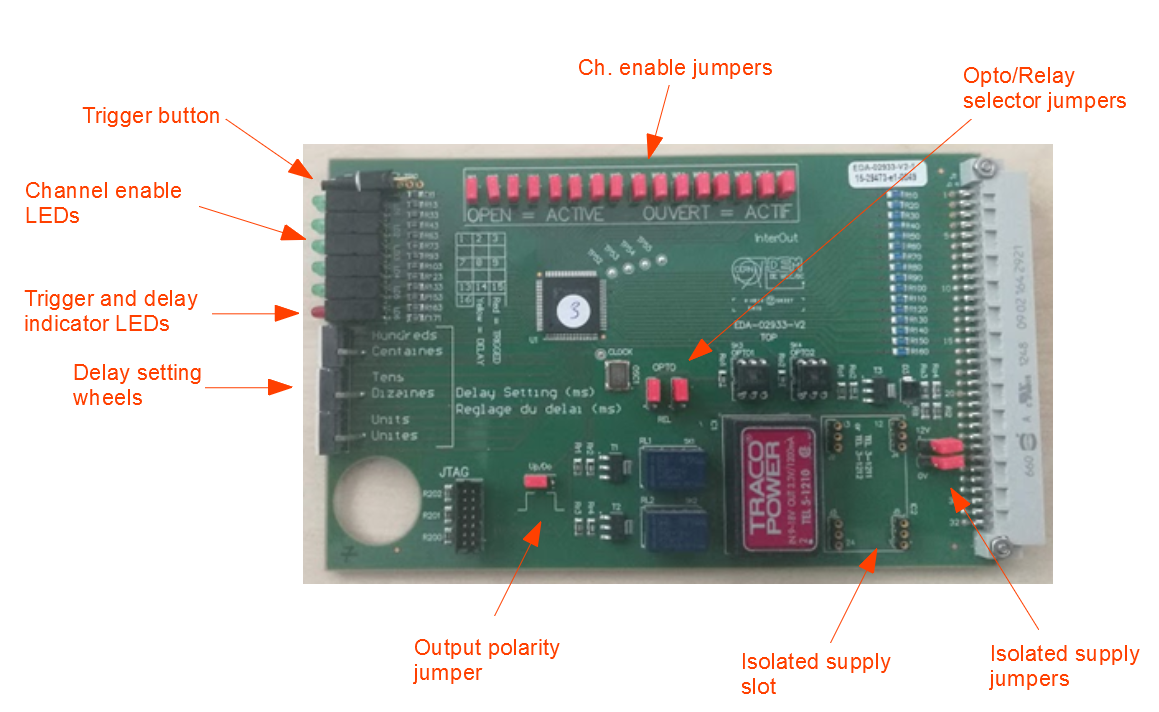

The settings of the card are:
| Setting | How it is set | Notes |
|---|---|---|
| Enabled input channels (1–16) | Jumpers at the top | A channel is enabled when the jumper is removed. Enabled channels are shown by the green LEDs on the front. |
| Delay | Three wheel switches | 0–9 ms (1 ms steps) + 0–90 ms (10 ms steps) + 0–900 ms (100 ms steps). The delay is the sum. The yellow LED flashes if the delay is not zero. |
| Relay or opto | Opto/relay selector jumpers | Chooses which switch drives the output. |
| Output polarity | Up/Down jumper | Decides whether the switch closes or opens on trigger (see Operational Notes/1. Safety Matrix - InterOUT output configurations explained > The Polarity Jumper Demystified). |
| Isolated supply | Module in the isolated supply slot + two jumpers (12V iso, 0V iso) | Empty, voltage source or current source. |
Other features of the card:
- the red LED lights up during a trigger;
- the push button on the front triggers the card manually;
- the output trigger is a pulse of 500 ms; if an enabled input stays active for more than 8 s, the output keeps triggering until the input disappears.
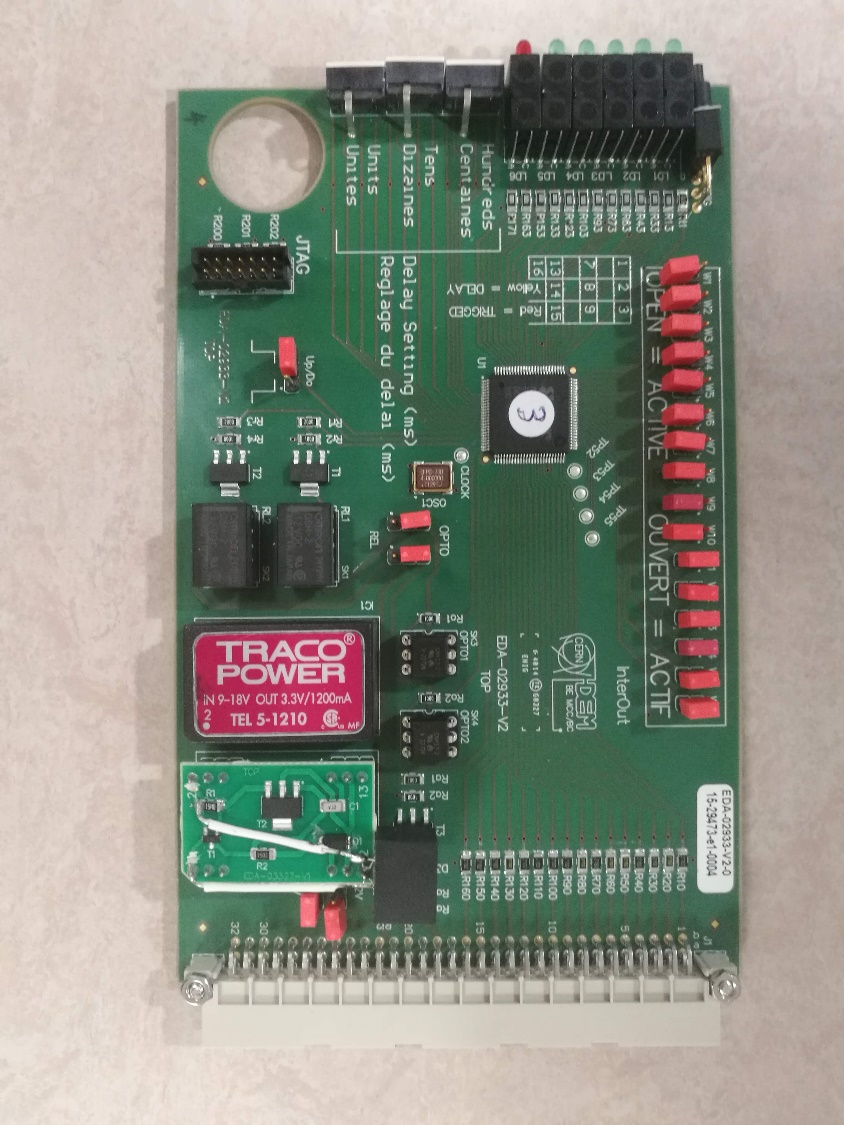
The Output Stage
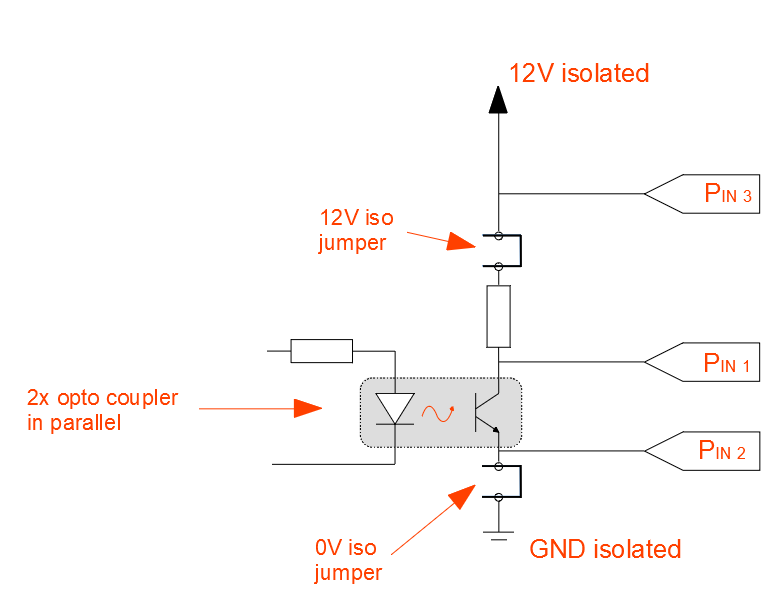
Behind each Burndy 4 connector there is always the same chain of five elements, from top to bottom (Figure 6):
- The isolated supply slot, which can be empty, or host a voltage source or a current source;
- The 12V iso jumper, which connects the supply to the rest of the chain. Despite the name, it is used also when a 5 V source is installed;
- The 5K resistor, the pull-up resistor;
- The switch, i.e. the two optos in parallel or the two relays in series;
- The 0V iso jumper, which connects the bottom of the chain to the isolated ground of the supply.
The three pins of the Burndy 4 connector are simply points taken along this chain:
- P3 (pin 3) is taken directly at the output of the supply, before the 12V iso jumper and the 5K;
- P1 (pin 1) is taken between the 5K and the switch;
- P2 (pin 2) is taken between the switch and the 0V iso jumper.
(Pin 4 is not connected.)
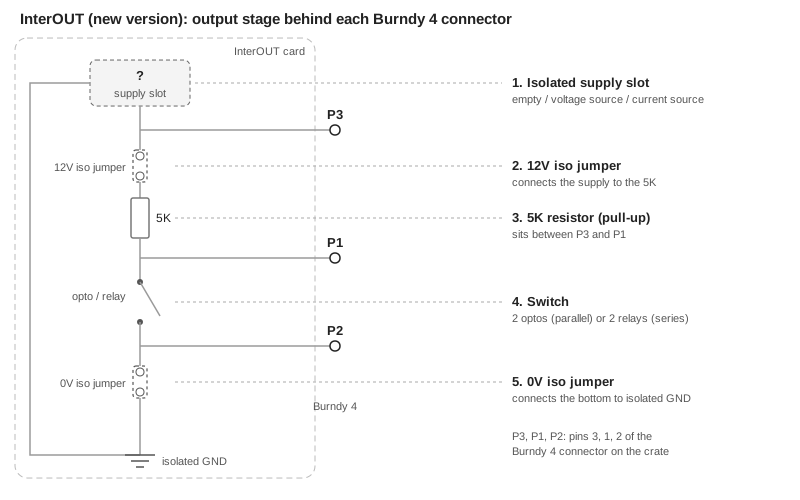
Every configuration is obtained by answering three questions:
- Who provides the energy to the circuit? Nobody (dry contact), a voltage source on the card, or a current source on the card. This decides what goes in the supply slot and how the two jumpers are set.
- Which pins go to the actuator? P1-P2 (across the switch) or P3-P1 (from the supply output to the switch, skipping the 5K).
- On trigger, does the switch close or open? This is set with the polarity jumper.
The three configurations used at FREIA are described below. In all the figures the thick orange line is the path where current flows.
Configuration 1: DAQ
Purpose. Tell the DAQ system to save the signals around the event. The DAQ does not need to be protected, it only needs a clear electrical signal to start the recording.
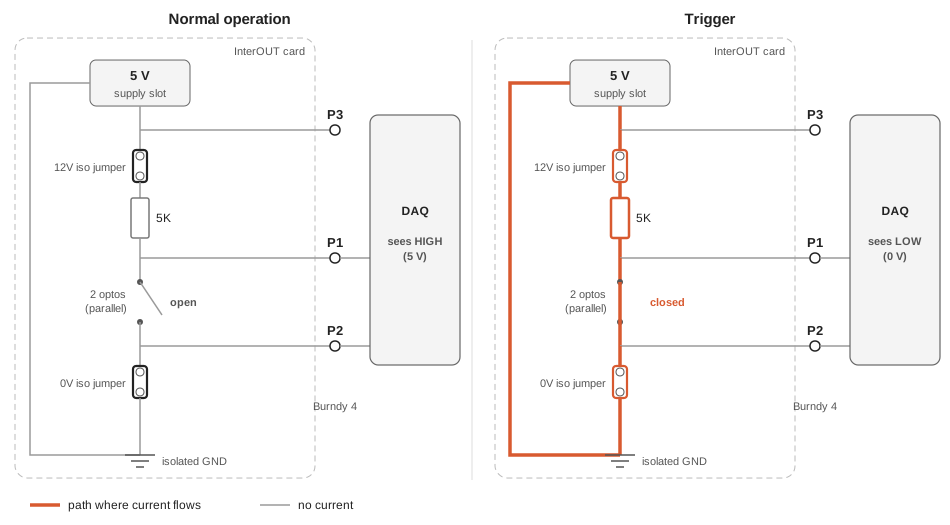
Normal operation. The opto is open. The 5 V source “pushes” through the 5K towards P1, but the loop is open at the switch, so no current flows (apart from the negligible one absorbed by the DAQ input). With no current, there is no voltage drop across the 5K (), so P1 sits at 5 V: the DAQ reads HIGH.
Trigger. The opto closes. Now the current flows from the source, through the 5K and the opto, to ground. P1 is connected to ground through the closed switch, so it drops to 0 V: the DAQ reads LOW. The passage from 5 V to 0 V is a falling edge, which starts the acquisition. This is consistent with the active-low logic of the whole chain.
Why like this. The DAQ needs a well-defined voltage level, which a dry contact alone cannot provide. The 5K limits the current when the switch is closed (5 V / 5000 Ω = 1 mA).
Configuration 2: Power Converter
Purpose. Stop the power converter (fast or slow power abort) when the Safety Matrix triggers.
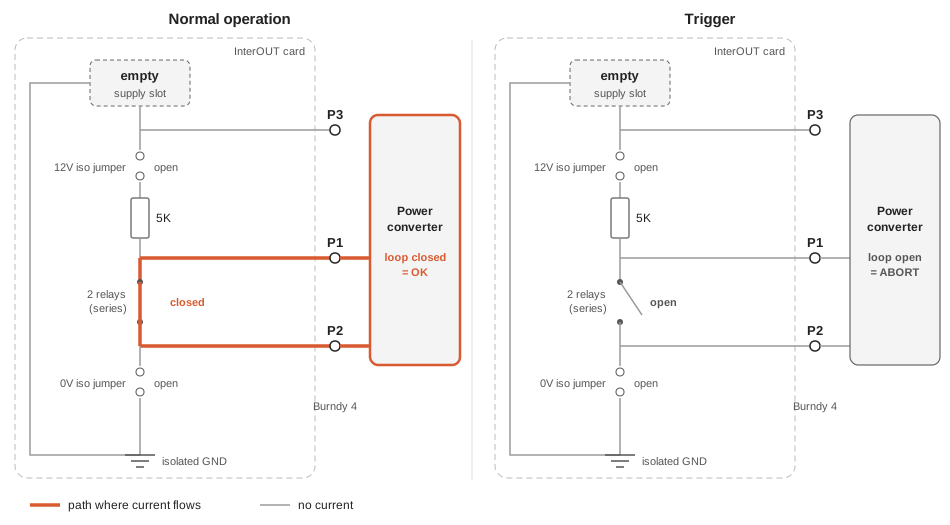
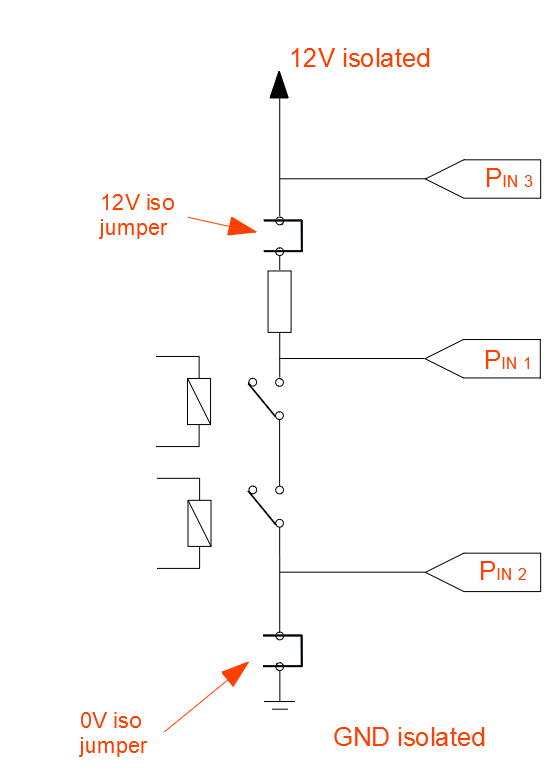
Normal operation. The two relays are closed. The loop between P1 and P2 is powered by the power converter itself, through its interlock input: the card only keeps it closed. As long as the PC sees its loop closed, it is allowed to deliver current.
Trigger. The relays open. The loop of the PC is interrupted and the PC performs the power abort.
Why like this. The PC already has its own interlock circuit and only needs a clean contact to open or close, so the card must not add any voltage of its own: this is why the slot is empty and the jumpers are disconnected (the 5K and the supply are completely out of the circuit). The logic is fail-safe: a cut cable or a missing card open the loop exactly like a trigger. The two relays are in series, so it is enough that one of them opens to interrupt the loop.
The quench heaters (QH) use exactly the same configuration.
Configuration 3: Energy Extraction
Purpose. Open the switches of the energy extraction, so that the current of the magnet is diverted into the extraction resistors and the stored energy is dissipated outside the magnet.
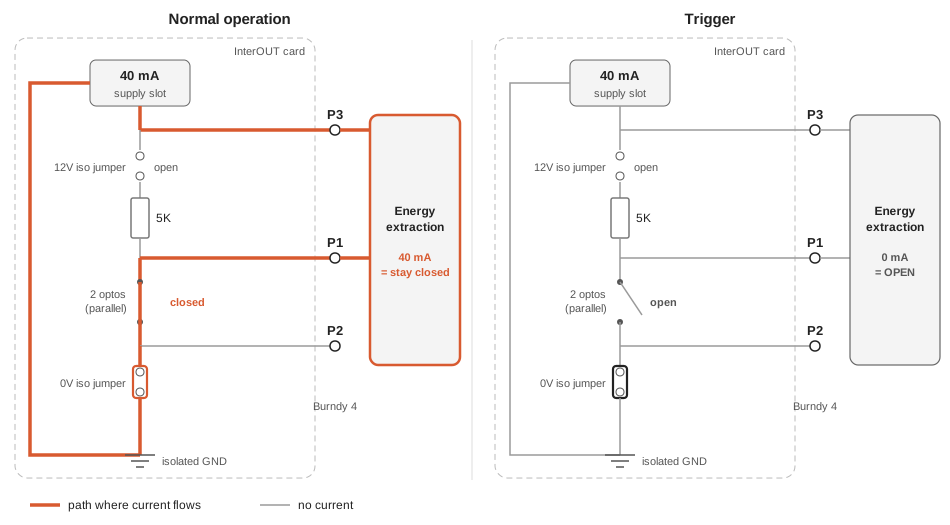
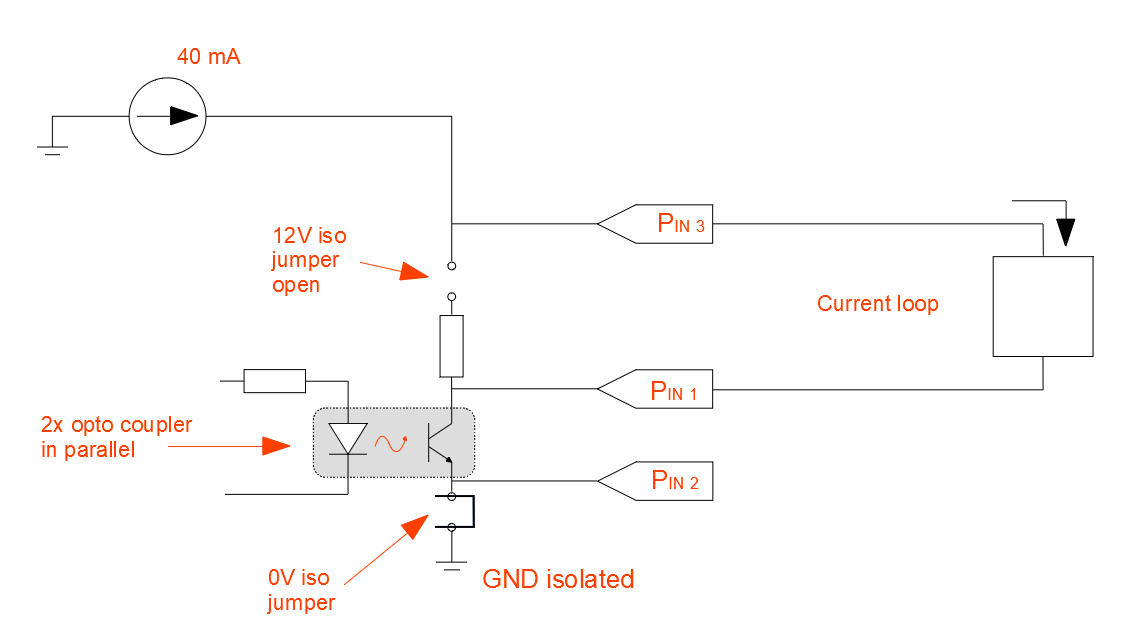
Normal operation. The opto is closed. The current source pushes its 40 mA out of P3, through the input of the EE, back into the card through P1, through the closed opto, through the 0V iso jumper to the isolated ground, and back to the source. The EE sees the current flowing and keeps its switches closed.
Trigger. The opto opens. The loop is interrupted, the current drops to zero, and the EE opens its switches.
Why a current loop. This is the most important point of the whole note: the logic is fail-safe. Current flows only if everything is in order: the card is in place, the crate is powered, the source works, the cable is intact and the opto is closed. Any fault (cable unplugged or cut, crate switched off, card removed, source broken) interrupts the current, and the EE reacts exactly as if a real trigger had arrived. For the system that extracts the energy from the magnet this is exactly the desired behaviour: when in doubt, protect the magnet.
Why pins 3-1 and the 12V iso jumper open. The 12V iso jumper is open because the supply slot hosts the current source, and the current must not go through the upper branch of the chain. Using P3 instead of P2 keeps the 5K resistor out of the path. If the 40 mA had to flow through the 5K, Ohm’s law gives:
The source would have to produce 200 V just to push the current through the resistor, which is impossible for such a small module. This is what the CERN document means when it says that the 5K would be “a too high load” for the 40 mA source.
The Polarity Jumper Demystified
The polarity jumper (Up/Down) decides whether the switch closes or opens on trigger. The CERN document gives the effect of each setting in a table:
Table 1: Effect of the output polarity on the new InterOUT card, on trigger.
| Polarity | Pull-up, opto | Pull-up, relay | Dry contact, relay | Current loop, opto |
|---|---|---|---|---|
| Down | Falling edge | Rising edge | Open | Enable current |
| Up | Rising edge | Falling edge | Close | Break current |
The confusing part is that, for the same setting, opto and relay do the opposite: with Down, on trigger the opto closes while the relays open; with Up, the opto opens while the relays close. This explains why the PC uses Down like the DAQ, but gets the opposite effect.
Instead of memorising the table, it is easier to start from what the actuator needs:
| Destination | What must happen on trigger | Switch | So the polarity is |
|---|---|---|---|
| DAQ | Output goes from HIGH to LOW (falling edge) | Opto closes | Down |
| PC (and QH) | The PC loop is interrupted | Relays open | Down |
| EE | The 40 mA current is interrupted | Opto opens | Up |
Note what PC and EE have in common: in normal operation their loop is closed with current flowing, and the trigger interrupts it. They are the two fail-safe outputs. The DAQ is the exception, because it only records and does not protect anything.
The polarity also affects the signals sent to the Burndy 28 connector (see Operational Notes/1. Safety Matrix - InterOUT output configurations explained > The Burndy 28 Connector): Down gives a falling edge, Up a rising edge.
All the Configurations of the Original Document
For completeness, the table of common configurations given in the CERN document is reported below. At FREIA the DAQ, PC and EE configurations are the ones in use; the others are listed for reference.
Table 2: Common output configurations (from the CERN document).
| Actuator | Signal type | Connection pins | Up/Down | Relay/Opto | Aux. power source | 0V iso | 12V iso |
|---|---|---|---|---|---|---|---|
| DAQ trigger | Pull-up | 1-2 | Down | Opto | 5 V voltage source | Connected | Connected |
| PC FPA/SPA | Dry contact | 1-2 | Down | Relay | Unpopulated | Disconnected | Disconnected |
| 30 kA EE | Current loop | 3-1 | Up | Opto | 40 mA current source | Connected | Disconnected |
| QH | Dry contact | 1-2 | Down | Relay | Unpopulated | Disconnected | Disconnected |
| CLIQ | Pull-up | 3-1 | Up | Opto | 12 V voltage source | Connected | Disconnected |
The CLIQ case looks contradictory (“pull-up” on pins 3-1), but it follows the same idea as the EE: the input of the CLIQ is itself an optocoupler with a high series resistor. If the 5K were added in series, the current would be too low to light the LED of the CLIQ optocoupler. Using pins 3-1 keeps the 5K out of the path, exactly as for the EE; here the energy comes from a 12 V voltage source instead of a current source.
The original schematics of the three output types are reported in Figures 10, 11 and 12.
Feedback
Found an error or something outdated in this note? Please contact Davide Cuneo (davide.cuneo@physics.uu.se).